I used to waste too much time staring at a full closet, unable to decide what to wear.
The problem wasn't a lack of clothes—it was poor organization, limited visibility, and no guidance when assembling outfits.
So I built a fashion web app that organizes wardrobes, suggests outfits, evaluates potential purchases, and refines recommendations through user feedback.
This article walks through the app's functionality, technical implementation, key design decisions, and the challenges that emerged during development.
Table of Contents
- Table of Contents
- What the App Does
- Why I Built It
- Tech Stack
- Product Walkthrough (What Users See)
- How I Built It
- Challenges I Faced
- What I Learned
- What I Want to Improve Next
- Future Improvements
- Conclusion
What the App Does
The app delivers six core features:
- Wardrobe management
- Outfit recommendations
- Shopping suggestions
- Discard recommendations
- Feedback and usage tracking
- Secure multi-user accounts
Users upload clothing items, browse suggested outfits, and rate recommendations. They can also track whether items are worn, kept, or discarded. This feedback generates structured data that improves future recommendation accuracy.
Why I Built It
Most fashion apps prioritize polish over utility. I wanted to build something that actually simplified daily wardrobe decisions.
The app needed to accomplish three things:
- Store each user's wardrobe data securely
- Personalize recommendations based on individual preferences
- Learn from user feedback to improve over time
That feedback loop transforms the app from a static tool into an adaptive system.
Tech Stack
The technical foundation:
- Frontend: React + Vite
- Backend: FastAPI
- Database: SQLite (local development)
- Background jobs: Celery + Redis
- Authentication: JWT (access + refresh token flow)
- Deployment support: Docker and GitHub Codespaces
This modular architecture enabled rapid frontend iteration, clean API boundaries, and independent evolution of the recommendation engine.
Product Walkthrough (What Users See)
1. Onboarding and Account Setup
Users register, verify their email, and complete profile details including body shape, height, weight, and style preferences.
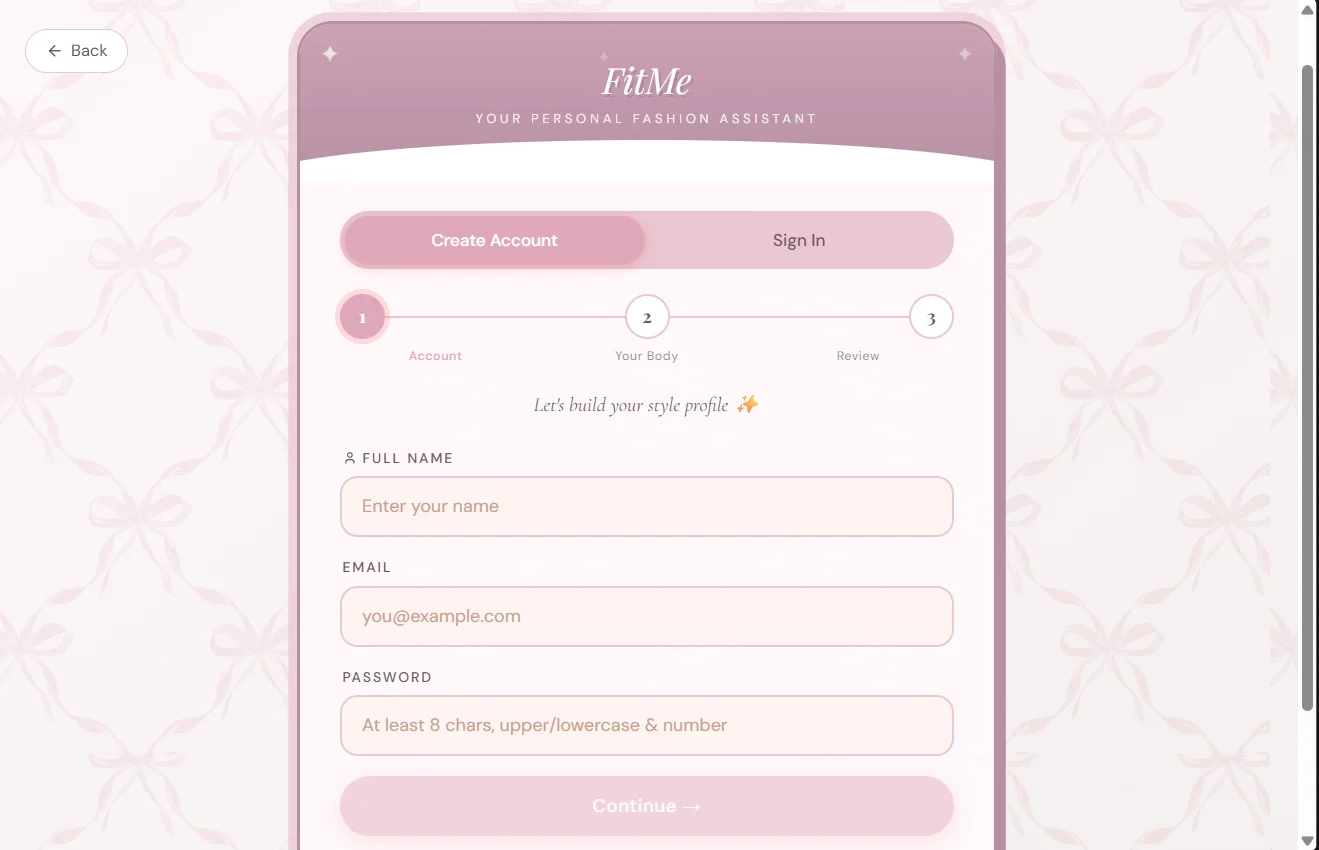
Each account maintains isolated wardrobe data and recommendation history.
2. Wardrobe Upload
Users upload clothing images, which the app analyzes to extract category, dominant color, secondary color, and pattern information.
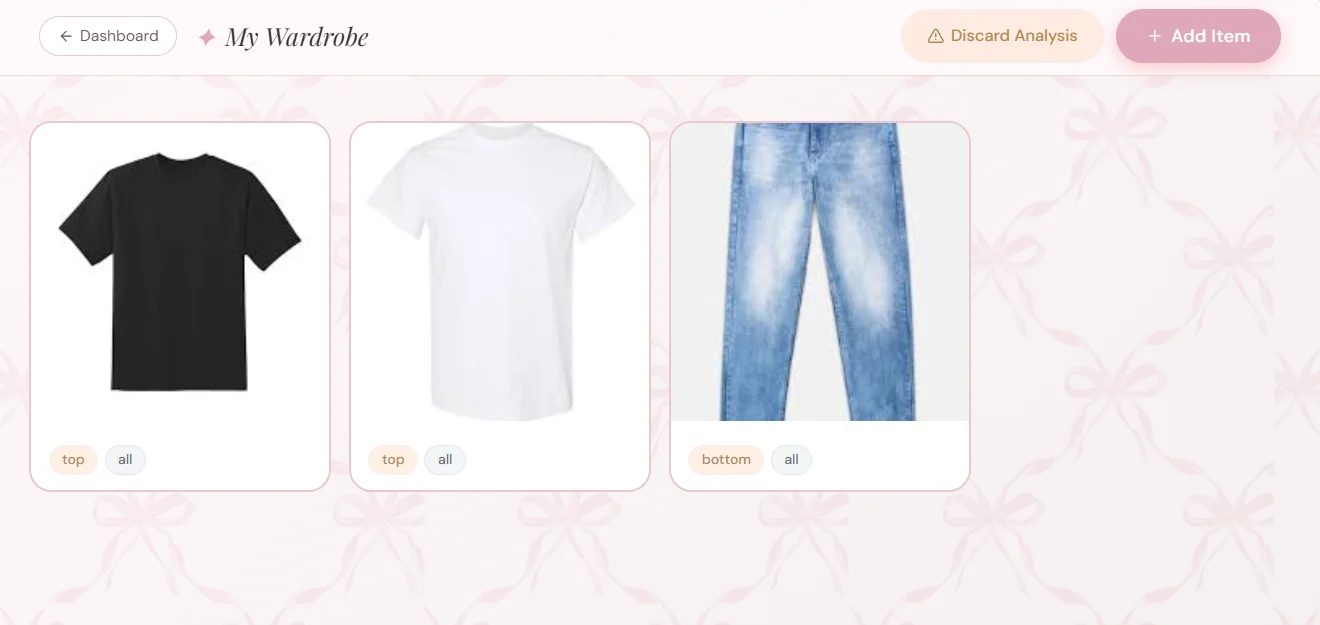
This metadata makes items searchable and enables the recommendation engine to generate relevant outfit combinations.
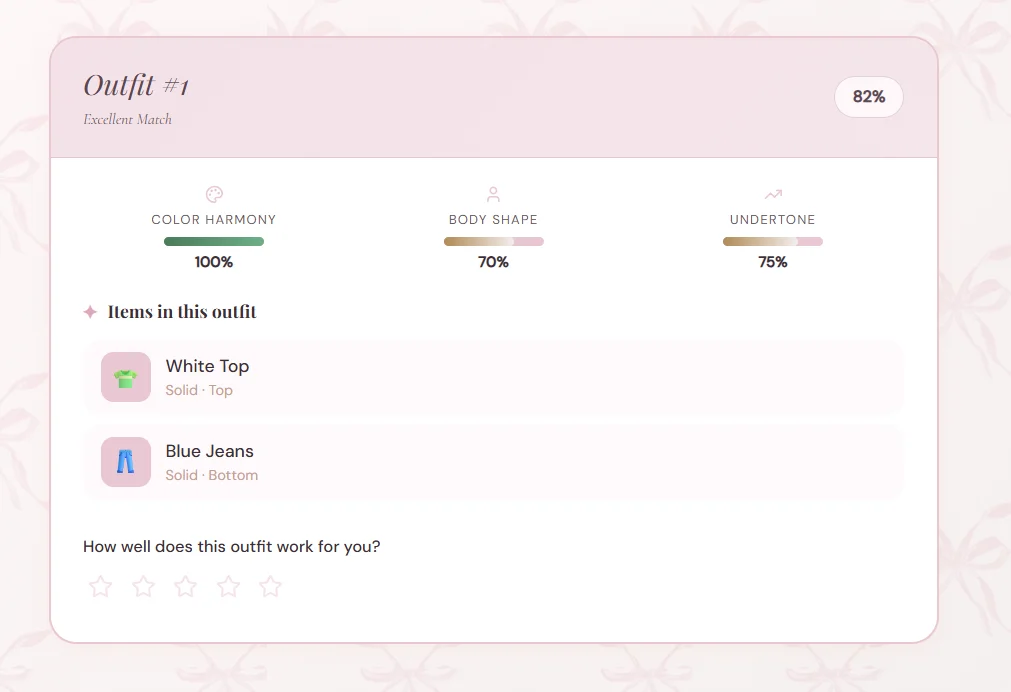
3. Outfit Recommendations
Users request outfit suggestions and rate the results. The system ranks recommendations using a weighted scoring model.
4. Shopping and Discard Assistants
The app evaluates potential purchases against existing wardrobe items and identifies underutilized pieces worth removing.
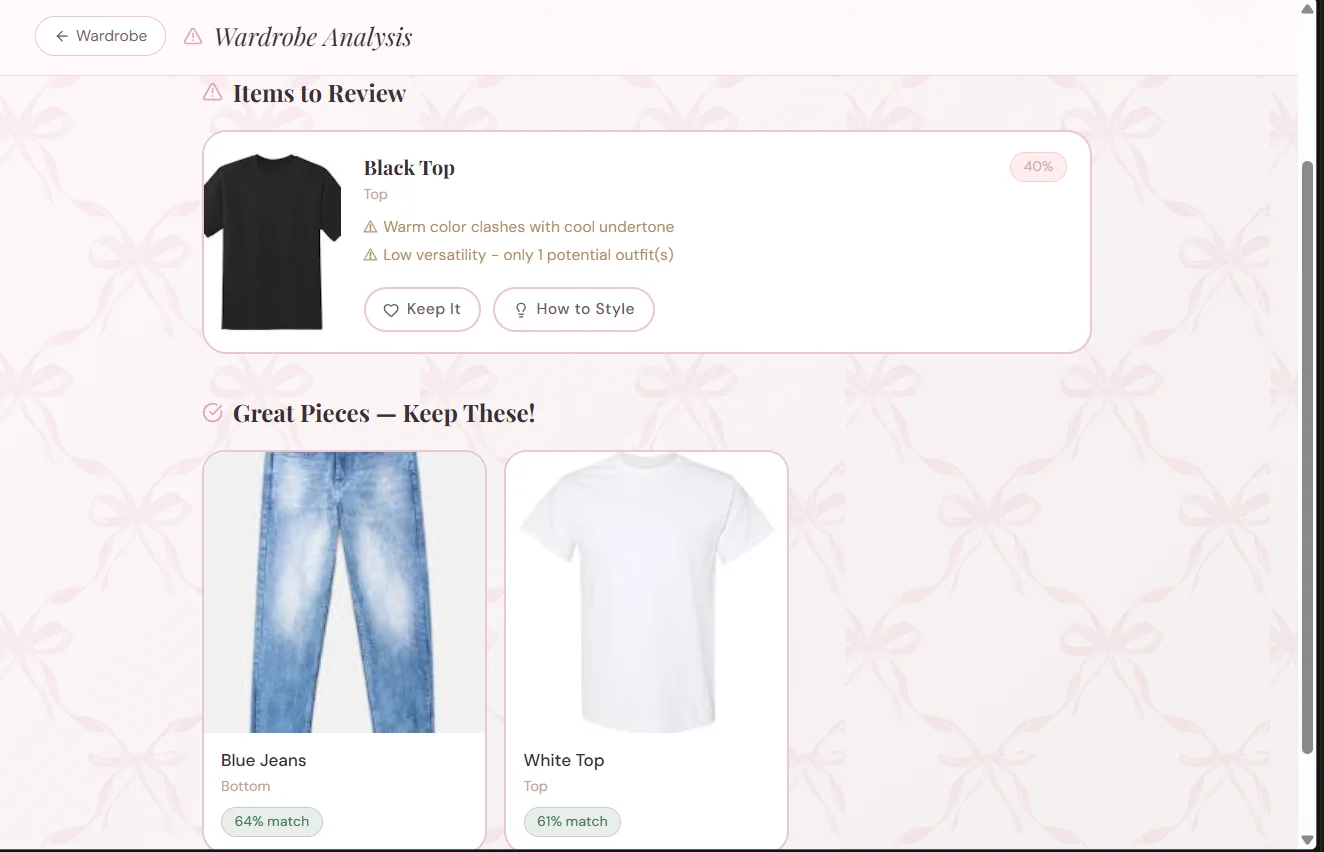
Each recommendation includes a score, written explanation, and styling suggestions—not just a binary keep/discard decision.
How I Built It
1. Frontend Setup (React + Vite)
React and Vite provided fast iteration and clean component architecture. The frontend organizes features into distinct areas: onboarding, wardrobe management, outfits, shopping, and discard suggestions. API calls live in a dedicated service layer, keeping UI components focused on rendering and interaction.
Example API client pattern:
export async function getOutfitRecommendations(userId, params = {}) {
const query = new URLSearchParams(params).toString();
const url = `/users/\({userId}/outfits/recommend\){query ? `?${query}` : ""}`;
const response = await fetch(url, {
headers: {
Authorization: `Bearer ${localStorage.getItem("access_token")}`,
},
});
if (!response.ok) {
throw new Error("Failed to fetch outfit recommendations");
}
return response.json();
}
Key elements:
URLSearchParamsconstructs optional query strings for filters like occasion, season, or result limit- User-scoped request paths isolate each user's recommendations
- The
Authorizationheader transmits the access token for backend verification - Response validation enables meaningful error handling in the UI
2. Backend Architecture with FastAPI
The backend organizes routes into logical groups:
- Auth routes: register, login, refresh, logout, sessions
- User analysis routes
- Wardrobe CRUD routes
- Recommendation routes: outfits, shopping, discard analysis
- Feedback routes: ratings and helpfulness signals
Ownership checks on user-scoped resources prevent unauthorized access to wardrobe and feedback data.
@app.get("/users/{user_id}/outfits/recommend")
def recommend_outfits(user_id: int, occasion: str | None = None, season: str | None = None, limit: int = 10):
user = get_user_or_404(user_id)
wardrobe_items = get_user_wardrobe(user_id)
if len(wardrobe_items) < 2:
raise HTTPException(status_code=400, detail="Not enough wardrobe items")
recommendations = outfit_generator.generate_outfit_recommendations(
wardrobe_items=wardrobe_items,
body_shape=user.body_shape,
undertone=user.undertone,
occasion=occasion,
season=season,
top_k=limit,
)
return {"user_id": user_id, "recommendations": recommendations}
Implementation details:
get_user_or_404retrieves profile data for personalizationget_user_wardrobefetches only the authenticated user's items- Minimum wardrobe validation prevents incomplete data from reaching the recommendation engine
generate_outfit_recommendationsisolates scoring logic for easier testing- Response format matches frontend consumption requirements
3. Recommendation Logic
The system uses deterministic rules before introducing machine learning, making behavior easier to debug and explain.
Outfit scoring combines weighted signals:
$$\text{outfit score} = 0.4 \cdot \text{color harmony} + 0.4 \cdot \text{body-shape fit} + 0.2 \cdot \text{undertone fit}$$
def score_outfit(combo, user_context):
color_score = color_harmony.score(combo)
shape_score = body_shape_rules.score(combo, user_context.body_shape)
undertone_score = undertone_rules.score(combo, user_context.undertone)
total = 0.4 * color_score + 0.4 * shape_score + 0.2 * undertone_score
return round(total, 3)
Scoring rationale:
- Color harmony ensures visual coherence
- Body-shape scoring optimizes for flattering silhouettes
- Undertone scoring aligns colors with user profiles
Discard and shopping recommendations use similar structures with adjusted factors and thresholds.
4. Authentication and Secure Multi-user Design
Security implementation includes:
- Short-lived access tokens
- Refresh tokens with JTI tracking
- Token rotation on refresh
session revocation (single session and all sessions)
email verification and password reset flows
The code below demonstrates the refresh-token lifecycle at the heart of the authentication system. This simplified example highlights the key control points without diving into every helper function:
def refresh_access_token(refresh_token: str):
payload = decode_jwt(refresh_token)
jti = payload["jti"]
token_record = db.get_refresh_token(jti)
if not token_record or token_record.revoked:
raise AuthError("Invalid refresh token")
new_refresh, new_jti = issue_refresh_token(payload["sub"])
token_record.revoked = True
token_record.replaced_by_jti = new_jti
new_access = issue_access_token(payload["sub"])
return {"access_token": new_access, "refresh_token": new_refresh}
Here's what happens in this flow:
The refresh token is decoded and its JTI (JWT ID) is retrieved from the database.
Revoked or reused sessions are rejected immediately, blocking replay attacks.
Each refresh generates a new token rather than reusing the old one, implementing token rotation.
A fresh access token is issued, keeping the session alive without requiring re-authentication.
This approach strengthened multi-device session security and gave me server-side control over logout behavior.
5. Background Jobs for Long-running Operations
Image analysis—classifying clothing, extracting colors, estimating body-shape signals—can be computationally expensive. To keep the request path responsive, I integrated Celery with Redis for background task processing.
This setup supports two execution modes:
synchronous processing for simpler local development
queued processing for heavier or slower jobs
This tradeoff preserved a straightforward developer experience while preventing expensive operations from blocking the application.
6. Data Model and Feedback Capture
Recommendation systems only improve when they capture meaningful signals.
I built dedicated feedback tables to track:
outfit ratings (1-5 scale with optional comments)
recommendation helpfulness (helpful/unhelpful feedback)
item usage actions (worn/kept/discarded)
Here's the structure of one feedback model:
class RecommendationFeedback(Base):
__tablename__ = "recommendation_feedback"
id = Column(Integer, primary_key=True)
user_id = Column(Integer, ForeignKey("users.id"), nullable=False)
recommendation_type = Column(String(50), nullable=False)
recommendation_id = Column(Integer, nullable=False)
helpful = Column(Boolean, nullable=False)
created_at = Column(DateTime, default=datetime.utcnow)
Breaking down this model:
user_idlinks feedback to the person who provided it.recommendation_typedistinguishes between outfits, shopping suggestions, and discard recommendations.recommendation_ididentifies the specific recommendation being evaluated.helpfulcaptures the user's direct response.created_atenables temporal analysis of feedback trends.
This infrastructure establishes a genuine learning foundation for the system, though the feedback-to-model-update loop remains a future enhancement.
Challenges I Faced
This section delivered the most valuable lessons.
1. Image-heavy endpoints were slower than I wanted
The analyze and wardrobe upload flows performed multiple operations simultaneously: image validation, classification, color extraction, storage, and database writes.
Initially, this made the request flow feel sluggish.
My solution:
I bounded concurrent image jobs to prevent the system from attempting too much work simultaneously.
I moved slower operations into background processing where feasible.
I used load-test results to identify genuinely expensive endpoints.
The practical impact: heavy image requests stopped competing so aggressively for resources. Rather than allowing numerous expensive tasks to accumulate within the same request cycle, I limited active work and delegated slower operations to the queue when necessary.
Why this worked:
Bounding concurrency prevented CPU-bound task overload.
Offloading expensive work to async jobs kept the main request/response cycle responsive.
Load testing provided empirical evidence, enabling data-driven tuning rather than speculation.
I didn't merely optimize the endpoint theoretically—I restructured the execution model so expensive analysis couldn't block subsequent requests.
2. JWT sessions needed real server-side control
Basic JWT implementations are straightforward to deploy, but they become problematic when you need session revocation or clean multi-device management.
My solution:
I persisted refresh tokens in the database.
I tracked token JTI values.
I implemented refresh token rotation on session renewal.
I added endpoints for single-session and all-session logout.
The critical shift: moving from "token exists, therefore session is valid" to "token exists, matches the database record, and hasn't been revoked or replaced." This gave the server authority to invalidate sessions immediately.
Why this worked:
Server-side token tracking enabled true revocation.
Rotation reduced token reuse risk.
Visible session management increased user trust.
This made logout-all and multi-device management functional rather than merely cosmetic UI features.
3. User data isolation had to be explicit
In a multi-user application, preventing one account from accessing another account's wardrobe data required deliberate design.
My solution:
I added ownership checks to user-scoped routes.
I filtered all wardrobe and feedback queries by
user_id.I used encrypted image storage instead of exposing raw file paths.
In practice, every route had to answer: "Does this user own the resource they're attempting to access?" If not, the request was rejected immediately.
Why this worked:
Ownership checks made data access rules explicit.
User-filtered queries prevented accidental cross-account reads.
Encrypted storage enhanced privacy and reduced direct image data exposure risk.
This combination ensured proper separation of wardrobe data, feedback history, and images across accounts.
4. Docker made the project easier to share, but only after the stack was organized
The application includes the frontend, backend, Redis, Celery worker, and Celery Beat—making reproducible setup the first challenge.
My solution:
I defined the stack in Docker Compose.
I documented required environment variables.
I aligned the dev stack with production architecture.
This eliminated setup ambiguity. Instead of requiring manual configuration of how the frontend, backend, Redis, and workers interconnect, the stack became self-describing.
Why this worked:
Docker reduced manual setup steps for contributors.
Clear environment configuration minimized setup errors.
Matching the stack to the architecture improved comprehension and testing.
With multiple moving parts, making startup behavior predictable was the simplest path to project accessibility.
What I Learned
This project delivered several important lessons:
Small features become significantly more valuable when they integrate cohesively.
Feedback data provides one of the strongest signals for recommendation improvement.
Clean data modeling becomes critical in multi-user environments.
Docker and clear setup documentation dramatically lower the barrier to project exploration.
I also learned that a project doesn't need massive scope to deliver value. A focused application that solves one problem well can still feel meaningful.
What I Want to Improve Next
My roadmap includes:
Integrate feedback directly into ranking updates
Add visual analytics for recommendation quality trends
Improve mobile UX parity
Deploy with persistent cloud storage and production database defaults
Provide a public demo mode for easier evaluation
Conclusion
This project evolved from a personal frustration into a complete web application with authentication, wardrobe storage, recommendation logic, and feedback infrastructure.
The most rewarding aspect was discovering how practical software decisions—not just polished UI—can help people make everyday choices faster.
If you want to explore or run the project, check out the repo. You can test the flows and share feedback. I'm particularly interested in input on recommendation quality, UX clarity, and features that would make this genuinely useful in daily life.