Want to share your content on R-bloggers? Click here if you have a blog, or here if you don't.
As Jumping Rivers approaches its tenth anniversary—having been founded in 2016—it's a fitting moment to reflect on a decade of growth and share some of the operational lessons learned along the way.
Regular readers will know that Jumping Rivers is a data science consultancy and training provider. What may be less well known is that the company offers a catalogue of over 50 courses spanning R, Python, Git, SQL, and more.
This post pulls back the curtain on the internal processes that make managing that catalogue tractable, covering practical techniques—code packaging and automated CI/CD—that are relevant to any large-scale coding project.
The challenge
Maintaining a catalogue of this size creates three distinct operational challenges.
1. Multilingual support
The course catalogue breaks down roughly as follows:
- 50% R
- 30% Python
- 5% R and Python
- 15% other (Git, SQL, Tableau, Posit, and more)
Any standardisation solution must be compatible with both R and Python at a minimum, and ideally extend to languages like SQL and Git as well.
2. Maintenance
The R and Python ecosystems move fast. The languages themselves are updated regularly, and the package landscapes on CRAN and PyPI evolve continuously. Code that ran without issue a year ago—or even yesterday—can break silently when a dependency is updated. Tracking this across 50+ courses without automation would be unmanageable.
3. Demand
Jumping Rivers delivers over 100 training events per year. For a relatively small team, that workload demands efficiency. Ideally, the mechanics of building course materials, provisioning cloud training environments, and handling course administration should be automated, freeing trainers to focus entirely on delivery quality.
The solution
The team draws on techniques it already applies for clients—automated reporting pipelines and packaging of reusable code—and turns them inward on its own training infrastructure.
Automated reporting
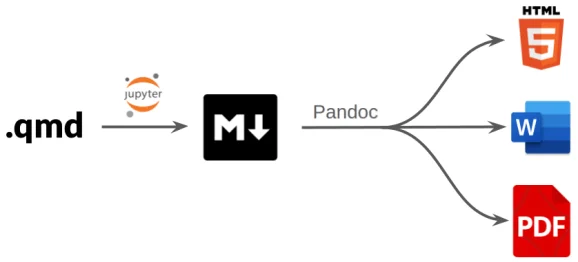
Consider the common scenario of a document that must be refreshed regularly—a monthly revenue presentation, for instance. Manually regenerating charts and tables and pasting them into a report is error-prone and time-consuming. A better approach is to use an automated reporting framework, and two strong open-source options exist: R Markdown and Quarto.
Both follow the same core pattern:
-
A YAML header at the top of the document specifies configuration and formatting:
---
title: "Introduction to Python"
authors:
- "Myles Mitchell"
date: "2026-04-02"
output: pdf
---
-
The document body is written in Markdown and can contain executable code chunks alongside prose:
## Introduction
At it's most basic, Python is essentially a calculator.
We can run basic calculations as follows:
```{python}
2 + 1
```
We can also assign the output of a calculation to a
variable so that it can be reused later:
```{python}
x = 2 + 1
print(x)
```
Code chunks can be configured to execute at render time, embedding any resulting outputs—plots, tables, summary statistics—directly into the final document. When the underlying data changes, regenerating the report is a single action.
Jumping Rivers applies this same principle to course notes and presentation slides. Embedding live code directly into course materials introduces a useful forcing function: any faulty or outdated example will produce a visible error at build time, before it ever reaches a learner.
Critically, both R Markdown and Quarto support R, Python, SQL, and Git syntax highlighting, and can render to HTML, PDF, and other formats—covering the full breadth of the course catalogue.
Internal R packages
Automated reporting solves the build problem, but with 50 courses, setting up each one from scratch would quickly become repetitive. A core principle in software engineering is to avoid duplication: shared logic belongs in functions, and functions belong in packages—self-contained, reusable, and testable units that reduce the number of places where bugs can hide.
Jumping Rivers applies this philosophy to its training infrastructure by packaging all reusable course assets—logos, template files, and styling—into a collection of internal R packages. When a new course is created, the developer focuses only on what is unique to that course:
- Code examples
- Notes
- Exercises
- Presentation slides
Everything else is handled automatically: the visual appearance of the materials, and the build routines that convert R Markdown or Quarto source files into finished HTML.
Separate internal packages handle the administrative side of training, including:
- Generating pricing quotes for clients.
- Producing post-course completion certificates.
- Spinning up bespoke Posit Workbench environments for each course.
- Summarising and reporting on attendee feedback.
GitLab CI/CD
Packaging and automated reporting create standardised, repeatable processes—but they don't address the challenge of monitoring 50+ live courses for issues. That's where CI/CD (Continuous Integration / Continuous Delivery and Deployment) becomes essential.
A CI/CD framework provides structure for software development through:
- Automated unit testing.
- Branching strategies and code review workflows.
- Versioning and deployment of software.
Cloud platforms like GitLab and GitHub extend version control with collaborative development tools, including CI/CD pipelines for automated testing and deployment, branch protection rules that enforce code review and testing gates, and source code tagging and versioning.
Each course at Jumping Rivers lives in its own GitLab repository. CI/CD pipeline definitions, along with the internal R packages, are maintained in a separate central repository and propagated downstream to all course repositories.
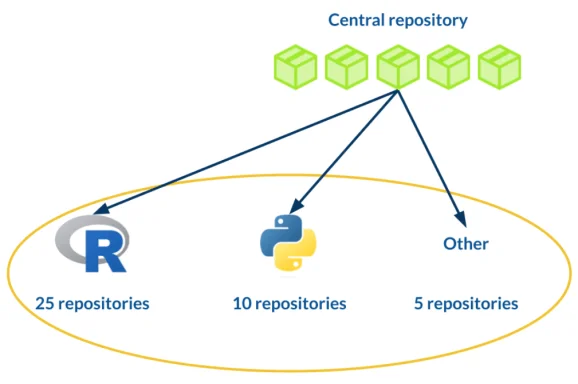
When a new course repository is created, it is automatically seeded with the standard CI/CD configuration. Every course is then subject to the same checks:
- Verifying that course notes build without errors.
- Requiring code review before any changes are merged into the main branch.
- Building and archiving the rendered HTML notes and scripts as versioned artifacts.
Pipelines are triggered by any commit to a course repository, and are also scheduled to run monthly across all courses—with failures surfaced immediately to the relevant trainer.
GitLab's hierarchical repository structure provides an additional benefit. Within the Jumping Rivers GitLab project, all training repositories sit within a dedicated "training" subgroup. Any environment variables or settings defined at the subgroup level cascade automatically to every course repository beneath it, eliminating the need to configure each one individually.
In summary
The principles behind Jumping Rivers' training infrastructure are broadly applicable to any large coding project:
- Avoid duplication: migrate reusable logic and assets into standalone packages.
- Adopt CI/CD: use GitLab, GitHub, or a comparable platform to automate testing, review, and deployment.
- Automate the routine: free up human attention for the work that actually requires it.
This infrastructure has been a decade in the making and continues to evolve. For a more detailed walkthrough, see this talk by Myles at SatRdays London 2024.
Further reading on automated reporting:
Further reading on packaging source code:
- Writing a personal R package
- Three-part series: Creating a Python package
- Four-part series: R package quality
For updates and revisions to this article, see the original post.
R-bloggers.com offers daily e-mail updates about R news and tutorials about learning R and many other topics. Click here if you're looking to post or find an R/data-science job.
Want to share your content on R-bloggers? Click here if you have a blog, or here if you don't.