Google Cloud customers frequently grapple with a fundamental challenge: optimizing generative AI costs while maintaining the performance and reliability their applications require.
The answer lies not in simply selecting the lowest-cost option, but in architecting the right combination of services that matches your specific workload characteristics and usage patterns.
This guide examines Google Cloud's gen AI infrastructure options, helping you identify the optimal balance between cost efficiency and performance. We'll begin with foundational pay-as-you-go (PayGo) models before exploring specialized options that can enhance your gen AI deployment strategy.
Pay-as-You-Go (PayGo): The foundation
Google Cloud's standard PayGo offerings deliver flexibility and power for most workloads. Understanding the underlying performance and availability mechanisms is essential to maximizing their value.
1. Dynamic Shared Quota (DSQ)
The standard PayGo environment operates on Dynamic Shared Quota (DSQ), a system that intelligently allocates GenAI capacity across customers rather than imposing rigid per-customer limits.
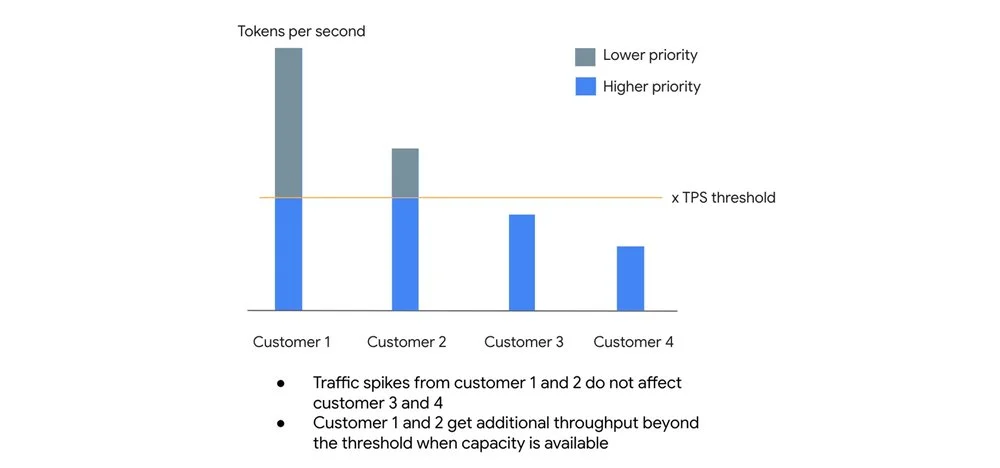
The mechanism:
- High-priority lane: Requests within your organization's default Tokens Per Second (TPS) threshold receive higher priority, with a 99.5% SLO target for availability.
- Best-effort lane: Traffic exceeding your TPS threshold isn't rejected outright. Instead, these requests are processed at lower priority when spare capacity exists.
This architecture prevents one customer's traffic surge from degrading baseline performance for others, while allowing opportunistic bursting when system capacity permits.
2. Usage tiers: Scaling with your investment
Google Cloud automatically assigns your organization to Usage Tiers based on rolling 30-day spend on eligible Vertex AI services. Higher tiers unlock higher guaranteed Tokens Per Minute (TPM) limits.
Current tier structure for popular model families:
Important: For current model thresholds, consult the documentation
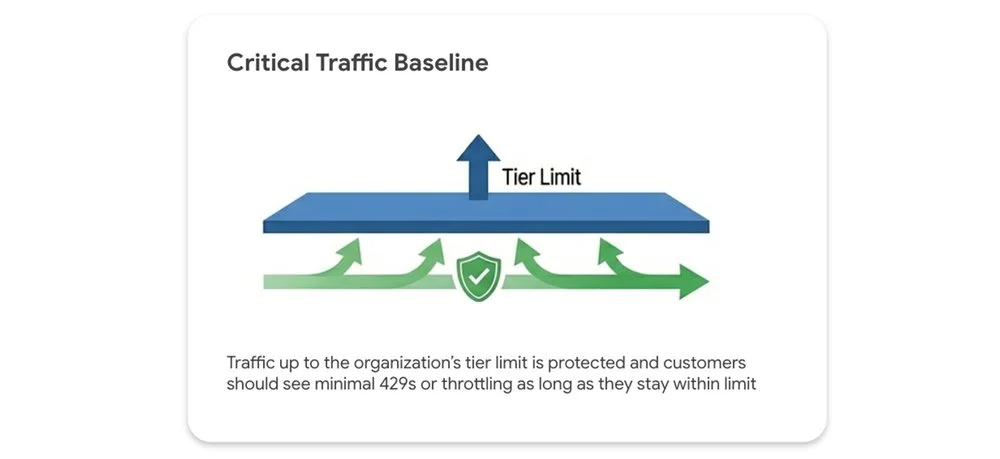
Your tier limit represents a performance floor, not a ceiling.
-
Protected traffic: Traffic within your tier limit is safeguarded, with minimal to no 429 (resource exhausted) errors expected.
-
Opportunistic bursting: Traffic exceeding your tier limit can still leverage spare system capacity on a best-effort basis. Fair-share throttling applies only when the entire system is under heavy load. Performance isn't artificially capped when idle capacity exists.
3. Priority PayGo: Protection against unpredictable spikes
For workloads with unpredictable traffic patterns where 429 errors are unacceptable, but fixed capacity commitments aren't feasible, Priority PayGo offers a middle ground: PayGo flexibility with enhanced availability guarantees.
For a premium, you can designate specific API requests for higher priority processing.
Important: Priority PayGo is currently available only for the global endpoint. Regional endpoint support may be added in future releases.
Implementation is straightforward: add a header to your API call. No sign-up or commitment required.
curl -X POST \
  -H "Authorization: Bearer $(gcloud auth print-access-token)" \
  -H "Content-Type: application/json" \
  -H "X-Vertex-AI-LLM-Shared-Request-Type: priority" \
  https://aiplatform.googleapis.com/...
Watch your ramp rate carefully. Scaling priority requests too aggressively can trigger downgrades to standard priority when capacity runs tight. A measured, gradual increase keeps requests at priority level and avoids unexpected performance drops.
Here's what happens:
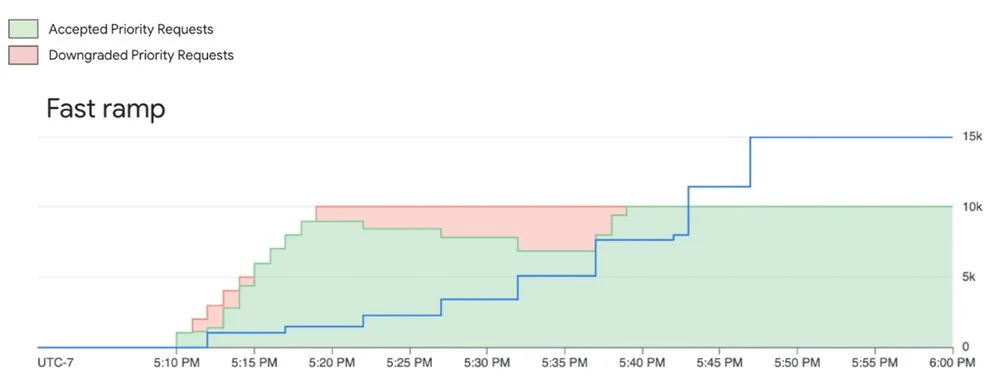
System tries to serve priority requests even when they are above the ramp limit, however they are subject to downgrading (not throttling) when capacity is constrained
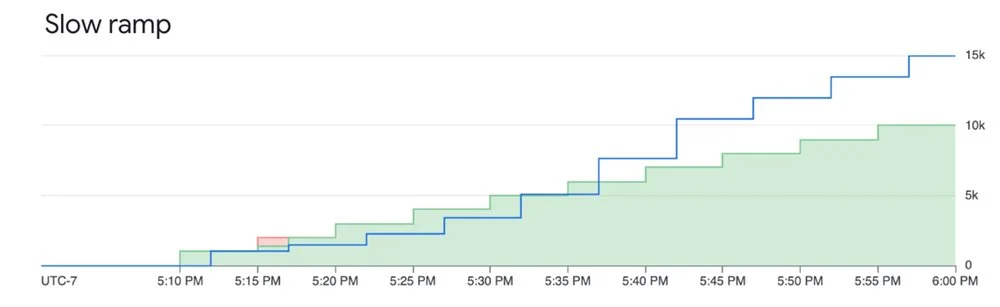
Ramping priority requests within the limit mitigates downgrading and ensures good experience
Track your Priority PayGo usage through the monitoring documentation.
For the uncompromising workload: Provisioned Throughput (PT)
When your gen AI workload is mission-critical and demands guaranteed availability, Provisioned Throughput is the answer.
PT reserves dedicated model processing capacity for a fixed monthly fee. It's the only option that includes an availability SLA. Standard PayGo offers an uptime SLA (the model is operational), but PT guarantees availability (your requests will be processed).
The distinction matters in how errors are counted. Error rate is defined as: the number of Valid Requests that result in a response with HTTP Status 5XX and Code "Internal Error" divided by the total number of Valid Requests during that period, subject to a minimum of 2000 Valid Requests in the measurement period.
Standard PayGo returns 429 errors for "Resource exhausted" scenarios, which don't count against the error rate. With Provisioned Throughput, when you stay within your purchased capacity, errors that would otherwise be 429s are returned as 5XX and count toward the SLA error rate. This is what creates the SLA difference between PT and PayGo.
Provisioned Throughput works best for:
- Large, predictable production workloads
- Applications with strict performance requirements where throttling isn't acceptable
Fine-grained control over your PT requests
By default, usage beyond your PT allocation automatically spills over to PayGo. You can control this behavior per request using HTTP headers:
Prevent overages: Add the dedicated header to ensure you never exceed your PT commitment. Any excess requests will be denied. Useful for strict budget control.
{"X-Vertex-AI-LLM-Request-Type": "dedicated"}Bypass PT on-demand: Use the shared header to intentionally route lower-priority requests to the PayGo pool, even with an active PT order. Perfect for experiments or non-critical jobs that shouldn't consume reserved capacity.
{"X-Vertex-AI-LLM-Request-Type": "shared"}Monitoring your investment
Track Provisioned Throughput usage through Cloud Monitoring metrics on the aiplatform.googleapis.com/PublisherModel resource. Key metrics include:
/dedicated_gsu_limit: Your dedicated limit in Generative Scale Units (GSUs)/consumed_token_throughput: Actual throughput usage, accounting for the model's burndown rate/dedicated_token_limit: Your dedicated limit measured in tokens per second
These metrics help you verify you're getting value from your commitment and optimize capacity over time. Learn more about PT on Vertex AI in our guide.
Building your recipe: Combining options for optimal results
Consider a workload with predictable daily baseline traffic, expected peaks, and occasional unexpected spikes. The optimal approach combines:
- Provisioned Throughput: Cover your predictable, mission-critical baseload with an availability SLA for core application traffic
- Priority PayGo: Handle predictable peaks above your PT commitment or important but less frequent traffic. Cost-effective insurance against 429 errors for variable high-priority traffic
- Standard PayGo (within tier limit): Foundation for general, non-critical traffic that fits within your organization's usage tier
- Standard PayGo (opportunistic bursting): For non-critical, latency-insensitive jobs like batch processing. If some requests are throttled, core user experience remains unaffected, and you avoid premium pricing
Understanding and combining these tools lets you optimize your GenAI strategy for the right balance of performance, availability, and cost.
Extra bonus: Batch API and Flex PayGo
Not every LLM request needs sub-second time-to-first-token (TTFT). Real-time chat requires low latency, but classifying millions of support tickets, running evaluations, or generating daily reports doesn't. The Gemini Batch API handles these asynchronous workloads efficiently. Bundle requests into a single file and submit it for processing during off-peak windows or when idle capacity is available. Target turnaround is 24 hours, though typically faster. By trading immediate execution for asynchronous processing, you get a 50% discount on standard token costs.
For live applications that don't require the lowest latency, Flex PayGo offers a 50% discount compared to Standard PayGo. Optimized for non-critical workloads that can accommodate response times up to 30 minutes, it allows seamless transitions between Provisioned Throughput, Standard PayGo, and Flex PayGo with minimal code changes. Ideal use cases include:
- Offline analysis of text and multimodal files
- Model quality evaluation and benchmarking
- Data annotation and labeling
- Automated product catalog generation
Get started
- Explore the Models in Vertex AI: Discover Google's first-party models and over 100 open-source models in the Model Garden
- Dive deeper into the documentation: The official Vertex AI documentation provides the latest technical details, thresholds, and code samples
- Review pricing details: Get a detailed breakdown of token costs, Provisioned Throughput pricing, and the latest discounts for Batch and Flex APIs on the Vertex AI pricing page