Moving your application load balancer infrastructure from on-premises hardware to Google Cloud's Application Load Balancer brings real advantages: elastic scalability, improved cost efficiency, and native integration across the Google Cloud ecosystem. But organizations making this transition typically face the same practical concern — what happens to the load balancer configurations they've built and relied on for years?
Those configurations often encode critical business logic for traffic handling, routing, and security. The reassuring reality is that not only can this logic be fully migrated, but the process itself creates a valuable opportunity to modernize and simplify how your applications manage traffic.
This guide walks through a practical migration path to Google Cloud's Application Load Balancer, covering common use cases and explaining when to use built-in declarative configurations versus the more powerful, event-driven Service Extensions edge compute capability.
A phased approach to migration
Moving from an imperative, script-driven system to a cloud-native, declarative model works best with a structured plan. We recommend a four-phase approach.
Phase 1: Discovery and mapping
Start by taking stock of what you have. Audit your existing load balancer configurations and document the intent behind each rule. Is it performing a simple HTTP-to-HTTPS redirect? Manipulating HTTP headers? Handling custom authentication logic?
Most configurations fall into two broad categories:
-
Common patterns: Logic shared by most web applications — redirects, URL rewrites, basic header manipulation, and IP-based access control lists (ACLs).
-
Bespoke business logic: Application-specific rules such as custom token authentication, advanced header extraction and replacement, dynamic backend selection based on HTTP attributes, or HTTP response body manipulation.
Phase 2: Choose your Google Cloud equivalent
With your rules categorized, the next step is mapping each one to the appropriate Google Cloud feature. This isn't a simple one-to-one replacement — it's a deliberate architectural decision.
Option 1: The declarative path (for approximately 80% of rules)
For the majority of common patterns, the Application Load Balancer's built-in declarative features are the right choice. Rather than maintaining scripts, you define the desired state in a configuration file — an approach that's easier to manage, version-control, and scale.
Key mappings from common patterns to declarative features:
-
Redirects/rewrites → Application Load Balancer URL maps
-
ACLs/throttling → Google Cloud Armor security policies
-
Session persistence → Backend service configuration
Option 2: The programmatic path (for complex, bespoke rules)
When standard declarative features aren't enough, Service Extensions fills the gap. This edge compute capability lets you inject custom code — written in Rust, C++, or Go — directly into the load balancer's data path, giving you fine-grained control within a modern, managed, high-performance framework.
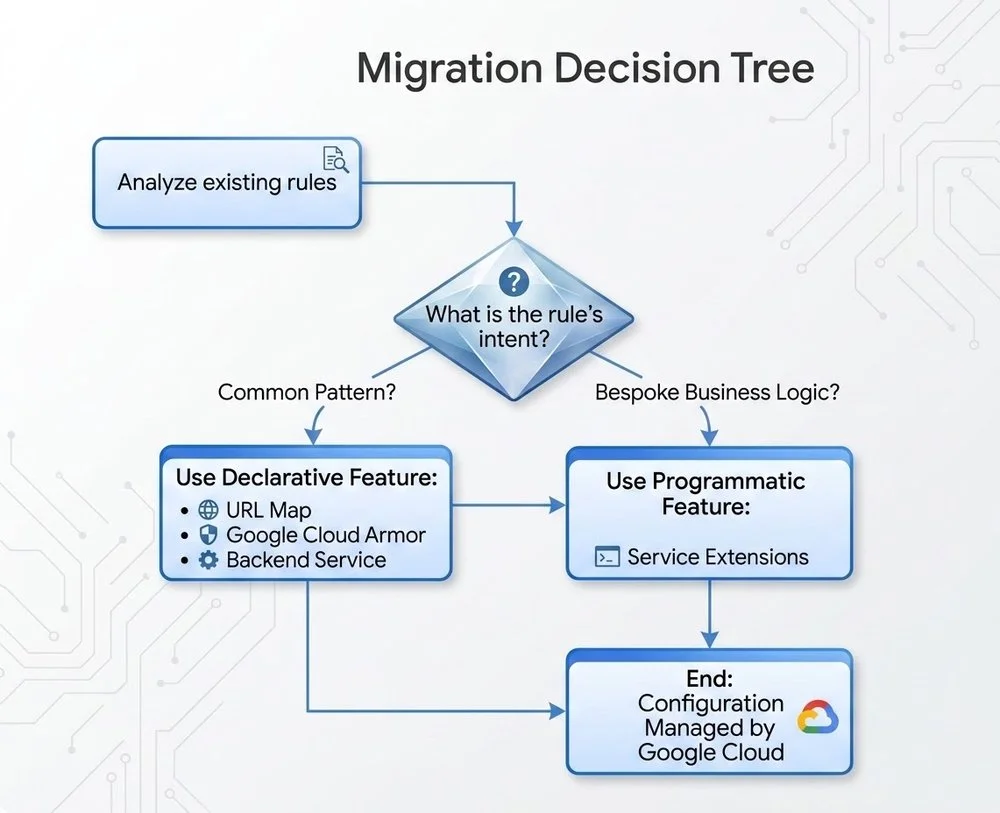
This flowchart helps you decide the appropriate Google Cloud feature for each configuration
Phase 3: Test and validate
With your migration path mapped out, deploy the new Application Load Balancer configuration in a staging environment that closely mirrors production. Test all application functionality thoroughly, with particular attention to the migrated rules. Use a combination of automated testing and manual QA to confirm that redirects, security policies, and any custom Service Extensions logic all behave as expected before touching production traffic.
Phase 4: Phased cutover (canary deployment)
Avoid switching all traffic at once. Instead, begin by routing a small percentage of production traffic — typically 5–10% — to the new Google Cloud load balancer, and monitor key metrics including latency, error rates, and overall application performance. As confidence grows, incrementally increase the traffic share directed to the Application Load Balancer. Throughout this process, maintain a clear rollback plan so you can revert to the legacy infrastructure quickly if critical issues emerge.
Best practices for a smooth migration
The following recommendations reflect practical lessons from real-world load balancer migrations:
-
Analyze first, migrate second: A thorough audit of your existing configurations is the most important step. Avoid carrying over logic that no longer serves a purpose — a migration is also a cleanup opportunity.
-
Prefer declarative features: Default to Google Cloud's managed, declarative capabilities — URL Maps and Cloud Armor — wherever possible. They're simpler to operate, easier to scale, and carry a lower maintenance burden.
-
Use Service Extensions strategically: Reserve Service Extensions for complex, bespoke business logic that declarative features genuinely cannot handle.
-
Monitor throughout: Keep a close eye on both old and new load balancers during the migration window. Track traffic volume, latency, and error rates so you can detect and respond to issues immediately.
-
Invest in team readiness: Ensure your team understands Cloud Load Balancing concepts before and during the migration. That knowledge will pay dividends when operating and maintaining the new infrastructure over the long term.
Migrating from on-premises load balancer infrastructure is more than a technical exercise — it's a chance to modernize your application delivery from the ground up. By thoughtfully mapping existing capabilities to either declarative Application Load Balancer features or programmatic Service Extensions, you can build infrastructure that's more scalable, resilient, and cost-effective as demands evolve.
To get started, explore the Application Load Balancer and Service Extensions documentation to identify the right design for your application. For guidance on more complex use cases, reach out to your Google Cloud team.